


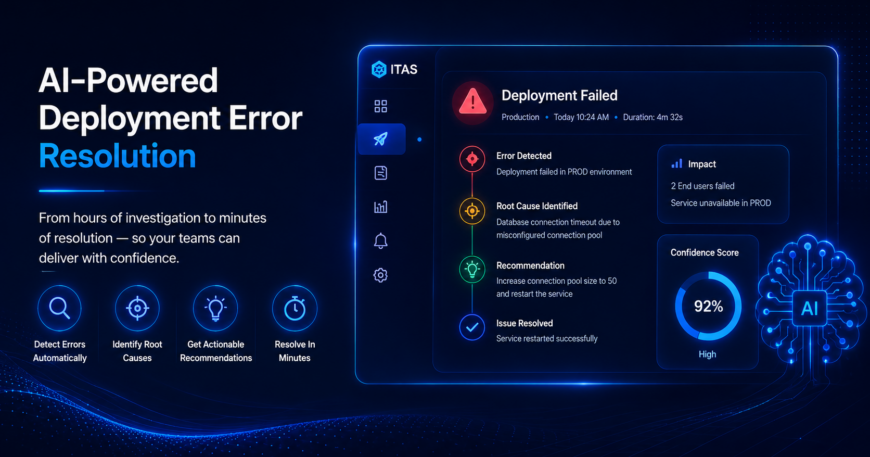
Deployment failures have long been one of the most disruptive and costly events in the software delivery lifecycle. For engineering teams, a single failed deployment can trigger a cascade of consequences: hours of log triage, frantic cross-team escalations, missed release windows, and significant diversion of engineering capacity away from the work that actually moves products forward. ITAS, powered by TestRunner’s enterprise automation engine, is changing that reality.
| Detection Time | Investigation Saved | Pipeline Stages |
| 2 min | Hours | 4-steps |
| Average time to identify deployment Failure | Per Incident vs manual log review | Detect, Analyze, Recommend, Resolve |
The Challenge
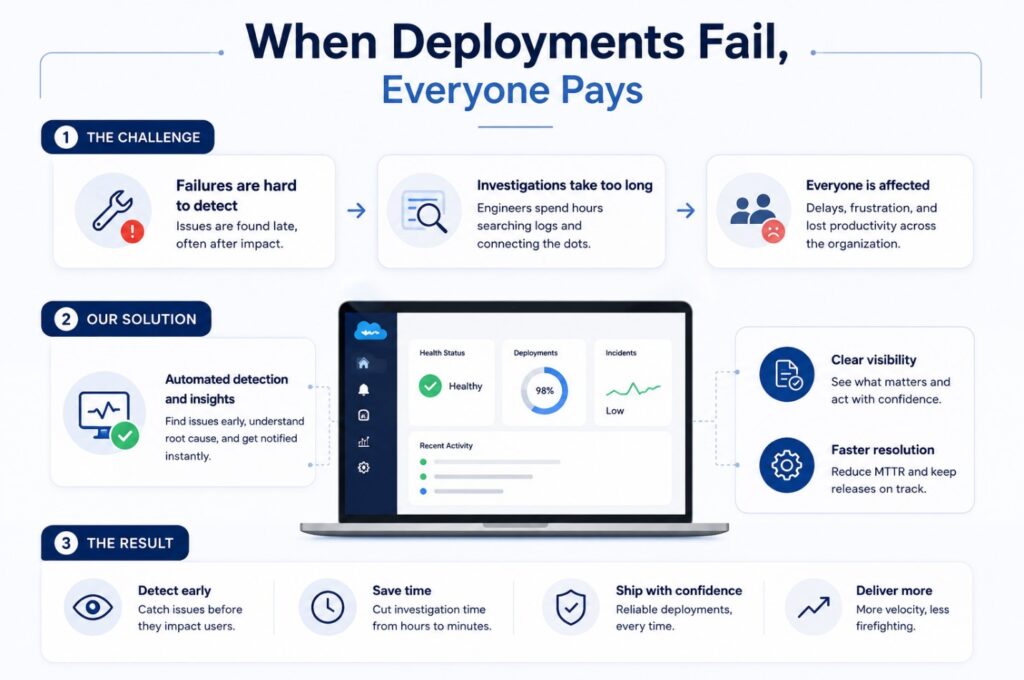
When Deployments Fail, Everyone Pays
A failed deployment used to be an all-hands moment and not the productive kind. Engineers would spend hours sifting through sprawling log files, attempting to isolate the root cause from mountains of system output. Issues would escalate through multiple team layers before anyone could confidently point to the source of the problem, and by then, release timelines had already slipped.
The cost, however, extended well beyond the technical. Every major deployment incident carried a significant organisational toll:
- Delayed timelines and release schedules pushed back, affecting downstream teams and stakeholder commitments.
- Frustrated stakeholders’ product managers, business leads, and clients left without clear answers or ETAs.
- Engineering capacity diverted, senior engineers pulled into firefighting mode instead of building new capabilities.
- Eroded team morale, repeated reactive cycles contribute to burnout and reduced confidence in the delivery process.
This pattern of detecting failure manually, investigating manually, escalating manually, resolve manually is not just slow. It is structurally incompatible with modern engineering velocity expectations, where teams are expected to ship frequently, reliably, and with confidence.
The Solution
ITAS: AI That Acts, Not Just Alerts
ITAS represents a fundamental shift in how deployment errors are handled. Rather than waiting for an engineer to notice something is wrong and begin an investigation, ITAS applies AI to automate the entire detection-to-resolution cycle in real time, at scale, without requiring manual triage as a first step. The system operates across four integrated stages:
| 1. Detect | 2. Analyze | 3. Insert | 4. Resolve |
| Monitor deployments and detect errors in real time. | Identify root cause with high accuracy. | Provide clear, actionable recommendations. | Engineer fixes and restores deployments quickly |
What makes ITAS particularly powerful is not any single stage in isolation, but the seamless, automated handoff between them. By the time an engineer is notified, the system has already completed what would have previously taken hours of manual work: it has detected the failure, traced the root cause, and prepared a recommended course of action. The engineer arrives at the solution, not the investigation.
| Real-world Example: Database Connection Failure in PROD |
| Error Detected: Deployment failure in PROD environmennt. |
| Root cause: Database connection timeout due to misconfigured connection pool. |
| Recommendation: Increase connection pool size to 50 and restart. |
| Time to detect: 2 minutes |
In a traditional setup, the above sequence would have involved reviewing production logs, cross-referencing database metrics, escalating to a DBA or infrastructure team, and trialling multiple potential fixes a process that could consume two to four hours. With ITAS, the same resolution path was surfaced within two minutes of the failure occurring.

